
Download Frigate NVR – Open‑Source AI Video Monitoring Tool
Introduction
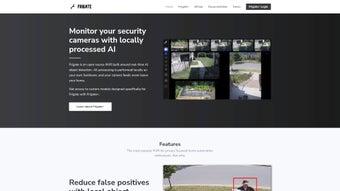
Frigate NVR is a powerful, open‑source network video recorder that brings on‑device artificial‑intelligence detection to any home, office, or small‑business surveillance system. Unlike cloud‑based video‑analytics platforms that require a constant internet connection and charge recurring subscription fees, Frigate processes every video frame locally, keeping your footage completely private and under your control. The core of the engine relies on the Google Coral Tensor Processing Unit (TPU), which can evaluate more than one hundred objects per second, delivering precise identification of people, vehicles, pets, packages, and even custom‑trained objects. By running inference on the edge, Frigate dramatically cuts down false‑positive motion alerts that plague traditional systems, providing a smoother, more reliable security experience.
The software is built with integration in mind. Native support for Home Assistant, OpenHab, Node‑RED, MQTT, and a range of other automation tools means you can instantly trigger lights, alarms, or push notifications the moment a defined object appears in a specific zone. The responsive web dashboard offers a real‑time video wall with bounding‑box overlays, and historic clips are just one click away. Whether you are a DIY hobbyist protecting a single driveway camera or a tech‑savvy homeowner managing dozens of indoor and outdoor feeds, Frigate NVR scales gracefully while staying cost‑effective.
Beyond its technical strengths, Frigate benefits from an active open‑source community that provides regular updates, thorough documentation, and a transparent roadmap driven by user feedback. This community‑first approach ensures that new detection models, bug fixes, and feature enhancements are delivered quickly, keeping the platform ahead of the curve in an ever‑evolving security landscape. In short, Frigate NVR delivers privacy‑first, high‑performance video monitoring without the hidden costs or data‑leak risks of cloud solutions.
Key Features of Frigate NVR
- Local AI object detection: Powered by the Google Coral TPU, Frigate analyses multiple video streams simultaneously without ever sending data to external servers.
- High detection throughput: Capable of processing over 100 objects per second, supporting people, cars, animals, packages and custom‑trained models.
- Zero‑cloud privacy: All video decoding and inference occur on‑premise, guaranteeing that footage never leaves your network.
- Deep home‑automation integration: Built‑in MQTT, Home Assistant, OpenHab, and Node‑RED support let you create real‑time alerts, automation triggers, and sensor entities.
- Dynamic web dashboard: Live video wall with configurable zones, bounding‑box overlays, and instant playback of detection clips.
- Customizable notifications: Email, push, or webhook alerts can be filtered by object type, camera, or zone for precise alerting.
- Flexible storage options: Store clips locally on SSDs, HDDs, or network shares; retain only events you care about to conserve space.
- Docker‑first deployment: One‑line Docker‑Compose setup simplifies installation on Linux, Windows (via WSL2), macOS, and NAS devices.
- Extensible plugin system: Community‑contributed add‑ons enable advanced analytics, facial‑recognition, and third‑party API integrations.
- Active open‑source community: Frequent releases, transparent roadmaps, and vibrant forums help you get support and contribute improvements.
Each feature is designed to address a specific pain point common in traditional surveillance solutions. Local AI detection eliminates the latency and privacy concerns of cloud processing, while the Docker‑centric approach abstracts away operating‑system quirks, making deployment as simple as copying a few configuration files. The integration capabilities mean Frigate can become the brain of a broader smart‑home ecosystem, turning a passive camera into an active participant that can turn on lights, lock doors, or send you a text message the instant a person steps onto your porch. Combined with flexible storage policies and a lightweight footprint, these features make Frigate NVR a compelling, future‑proof choice for anyone serious about secure, private video monitoring.
Installation, Compatibility & First‑Run Usage
Step‑by‑Step Installation
Frigate is intentionally built for a smooth Docker deployment. Begin by installing Docker Engine (or Docker Desktop on Windows/macOS). Once Docker is ready, create a dedicated directory for your Frigate instance and copy the docker‑compose.yml file from the official GitHub repository.
Edit the file to add your camera RTSP URLs, set the TPU_DEVICE path if you are using a Coral USB accelerator, and define storage locations for recordings. After saving the changes, run docker‑compose up -d. Docker will pull the Frigate image, spin up an internal MQTT broker, and expose the web UI on port 5000 by default.
Operating System Support
Frigate officially supports major Linux distributions (Ubuntu, Debian, Fedora, Arch), Windows 10/11 via WSL2, macOS (Intel and Apple Silicon) through Docker Desktop, and a range of NAS platforms that provide Docker (Synology, QNAP, TrueNAS). The AI inference relies on a Google Coral TPU, but a CPU‑only fallback mode is available for systems without the accelerator, albeit with reduced performance.
First‑Run Configuration
After the containers are up, open a web browser and navigate to http://localhost:5000. The onboarding wizard guides you through adding cameras, selecting detection models, and defining zones such as “front door” or “garage”. Enable MQTT in the settings panel if you plan to integrate with Home Assistant; the broker credentials are auto‑generated but can be overridden. Once cameras are added, the dashboard displays live streams with colored boxes around detected objects. Clicking any detection opens a 30‑second clip that includes pre‑ and post‑event footage, automatically saved to the storage path you defined.
Tips for Optimal Performance
- Use a dedicated SSD for event recordings to minimize latency and improve write speeds.
- Allocate at least 2 GB of RAM to the Docker container when running with a Coral TPU for smooth inference.
- Adjust each camera’s resolution and frame rate to match your network bandwidth and storage capacity.
- Fine‑tune motion thresholds and object filters in the
config.yml“cameras” section to reduce false alerts. - Regularly purge old clips or move them to a network share to keep local storage from filling up.
Following these steps ensures a stable, responsive installation that can handle multiple high‑resolution streams while delivering real‑time AI detection. The combination of Docker isolation, flexible OS support, and clear configuration options makes Frigate NVR accessible to both seasoned IT professionals and enthusiastic hobbyists.
Pros, Cons, FAQ & Conclusion
Pros
- Fully local processing guarantees privacy and eliminates recurring cloud fees.
- High‑speed AI detection with the Coral TPU provides real‑time alerts.
- Extensive integration with Home Assistant, OpenHab, MQTT, and Node‑RED.
- Open‑source codebase with active community support and frequent updates.
- Docker‑first deployment ensures portability across Linux, Windows, macOS, and NAS devices.
Cons
- Initial setup can be intimidating for users without Docker experience.
- Optimal performance requires a compatible Coral TPU; CPU‑only mode is slower.
- No dedicated native mobile app; remote access relies on the responsive web UI.
- Advanced features like custom model training demand additional learning.
- Large camera fleets need careful storage planning to avoid capacity issues.
FAQ
Do I need a Google Coral TPU to run Frigate?
A Coral TPU is highly recommended because it provides the speed needed for real‑time object detection (100+ detections per second). However, Frigate can run in CPU‑only mode; detection will be slower and may miss fast‑moving objects, but the system remains fully functional.
Can Frigate integrate with Home Assistant?
Yes. Frigate publishes MQTT topics that Home Assistant can subscribe to. There is also a native Home Assistant integration that automatically creates binary sensors, camera entities, and event triggers based on detections.
Is there a mobile app for remote viewing?
Frigate does not ship a dedicated mobile app, but the responsive web UI works on smartphones and tablets. You can also embed Frigate streams into Home Assistant’s Lovelace UI for a unified mobile experience.
How does Frigate handle storage for long‑term video?
Frigate saves only event clips by default, which reduces storage consumption dramatically. You can configure retention policies, move older clips to network shares, or enable continuous recording on a per‑camera basis if needed.
Can I add custom object detection models?
Yes. Advanced users can supply their own TensorFlow Lite models via the model section of config.yml. Community forums provide tutorials for training custom models and integrating them into Frigate.
Conclusion & Call to Action
Frigate NVR stands out as a privacy‑first, high‑performance alternative to cloud‑based surveillance services. By combining open‑source flexibility with the raw processing power of a Google Coral TPU, it delivers accurate, real‑time object detection while keeping every frame on your own network. The seamless integration with Home Assistant, OpenHab, and Node‑RED turns a simple security camera into a proactive component of a smart home, capable of triggering lights, alarms, or custom automations the moment a person or vehicle enters a defined zone. Though the initial setup may feel technical, the extensive documentation, active community, and Docker‑centric deployment make the learning curve manageable for most hobbyists and IT professionals alike.
Ready to experience secure, AI‑driven video monitoring? Download Frigate NVR today, follow the quick‑start guide, and join the community forums to fine‑tune your setup. Protect what matters most—without ever handing your footage over to the cloud.



.png)



